Bring damaged, faded, and torn family photos back to life in seconds. Upload an old print and our AI removes scratches, sharpens faces, and revives colors — no Photoshop or editing skills needed.


Digital photo restoration that repairs damage while keeping the original composition and authentic feel of your photo.
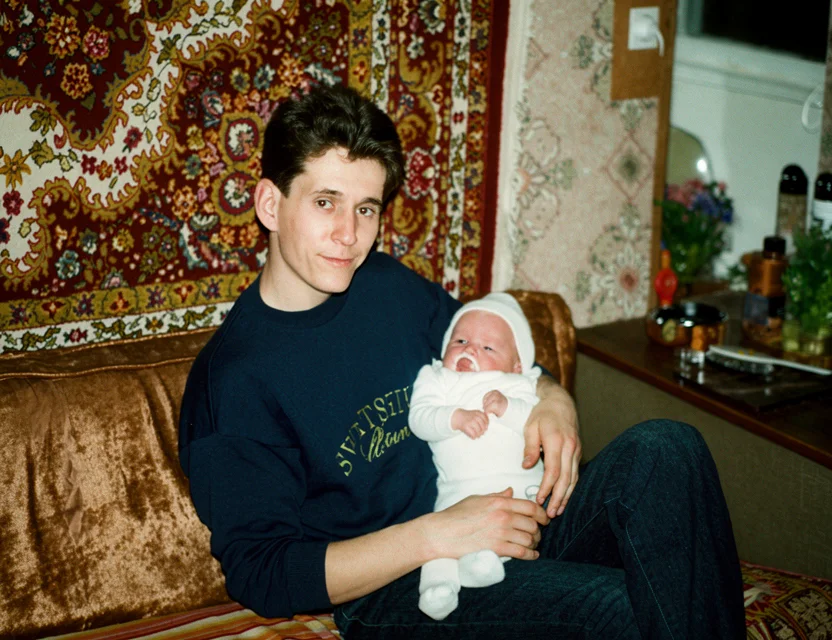 After
After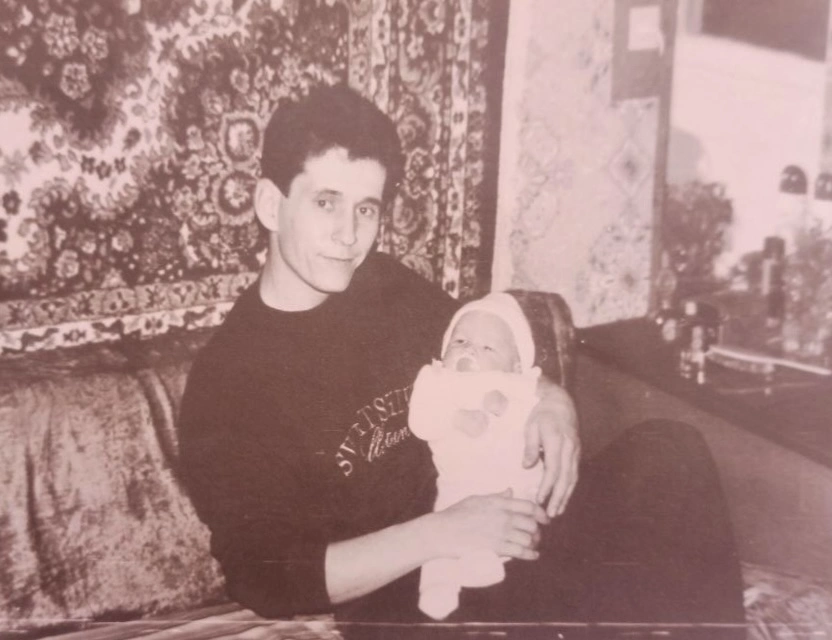 Before
Old prints rarely suffer from just one problem. AI photo restoration detects and repairs the most common kinds of damage in a single pass:
Surface scratches and scuff marks are detected and filled with matching detail.
Torn edges and creased corners are reconstructed so the damage disappears.
Contrast and color balance are rebuilt, removing the yellow or sepia cast of age.
Water stains, foxing spots, and dust marks are cleaned without blurring the picture.
Faces are sharpened and reconstructed while keeping each person recognizable.
Small prints and crops are upscaled so the restored photo prints and shares well.
Scratches, rips, folds, stains, and spots on old prints are detected and removed automatically.
Faces are intelligently enhanced and sharpened while preserving how each person really looked.
Yellowed, washed-out, and discolored photos get their original vibrancy back automatically.
No editing skills required — just upload an old photo and get a restored result in seconds.
When you photograph an old print, the app first detects the photo’s boundaries and corrects the perspective, so a snapshot taken at an angle becomes a clean, flat scan. You can fine-tune the corners by hand, but in most cases the automatic crop is already right.
The image then goes to a restoration model trained on millions of photo pairs — damaged originals matched with clean versions. The AI learns what scratches, tears, stains, and fading look like, and how the underlying picture should appear without them. It repairs damage while preserving the original composition, expressions, clothing, and background.
Finally the result is enhanced: faces are sharpened, grain is reduced, and colors are corrected for age-related fading. The whole pipeline takes seconds per photo, and you can compare before and after side by side before saving the restored version to your phone.
Photograph your old print with your phone
Fine-tune the detected edges if needed
Get your restored photo in seconds
| What it takes | WowPhoto AI app | Photoshop or a paid service |
|---|---|---|
| Time per photo | Seconds, fully automatic | Hours of retouching, or days waiting for a service |
| Cost | First restoration free | Professional restoration services charge per photo |
| Skills needed | None — snap a photo of the print | Advanced Photoshop retouching skills |
| Equipment | Just your phone — no scanner | Scanner, desktop software, licenses |
Take a photo of your old print with your phone or upload an existing scan, and our AI automatically removes damage, sharpens faces, and restores colors in seconds.
Yes — you can download the app and get your first photo restoration for free.
Professional photo restoration services charge per photo and take days, and local shops ask you to hand over your originals. An AI photo restoration app gives you a comparable result in seconds, right from your phone — and your first restoration is free.
Just a few seconds. The AI processes your photo automatically with no manual editing required.
No — we repair damage and enhance clarity while preserving the original composition and the authentic look of the people in it.
Yes. Faded and damaged black and white photos are restored, and you can also colorize them for a lifelike result.
Not at all. Everything is automatic — no Photoshop, no manual retouching, and no technical knowledge needed.
Yes — the AI reconstructs torn edges, creases, and even missing corners by filling them with matching detail. Very large missing areas (for example, half of a face) may not fully recover, but typical tears and cracks repair cleanly.
No. Photograph the print with your phone camera — the app detects the photo’s edges, flattens the perspective, and treats it like a scan. A scanner still works too: you can pick any image from your gallery.
The restored image is saved in high resolution, upscaled beyond the original snapshot, so it looks good on screen and in print. Very small or heavily cropped originals gain the most.
Photos are uploaded over an encrypted connection and processed only to create your restoration. We never post your pictures publicly, never use them for advertising, and a result is shared only if you choose to share it. Restorations live in your personal in-app gallery, and you stay in control of every photo.
Download the app and get your first restoration for free.