Restore old photos right from your phone — no scanner, no Photoshop, no desktop software. Snap a picture of a print and the AI repairs damage, sharpens faces, and revives colors in seconds.


Before and after from a single snapshot of an old print — restored on a phone in seconds.
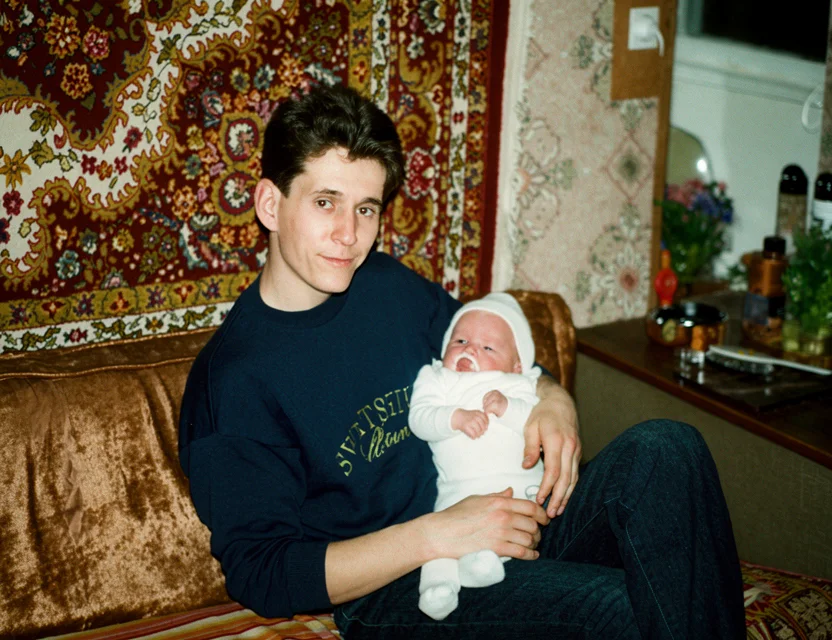 After
After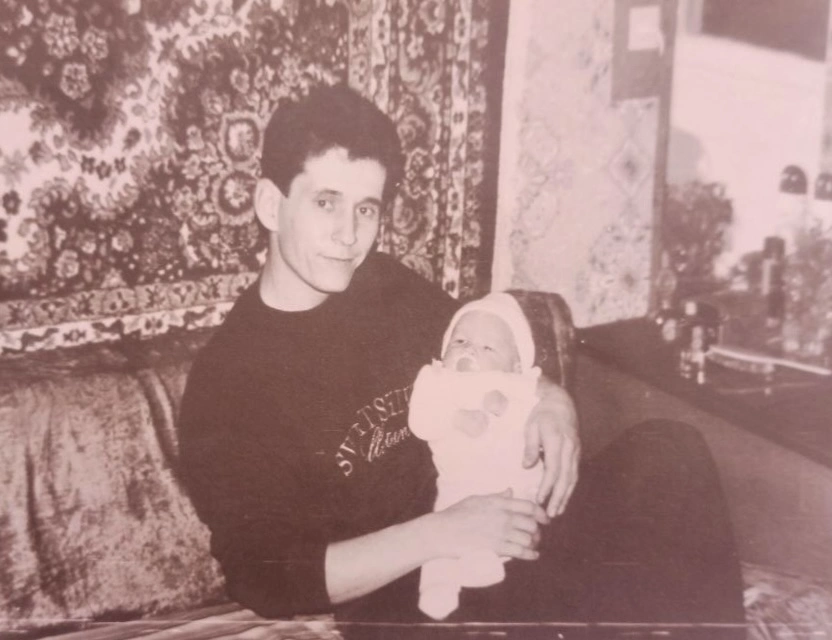 Before
One app replaces a scanner, desktop software, and a set of single-purpose tools:
Scratches, tears, stains, creases, and fading repaired automatically.
B&W and sepia photos get realistic, scene-aware color.
Blurry, pixelated, and grainy pictures become clear again.
Small and low-res images gain real resolution for printing and sharing.
Faces are reconstructed naturally in every mode.
Photograph a print — edges are detected and perspective corrected like a scan.
No scanner needed — photograph the print and the app detects the edges and corrects the perspective automatically.
Damage on old prints is removed automatically, and faded, yellowed colors come back to life.
Blurry and faded faces are sharpened while keeping everyone looking like themselves.
Download the app and your first photo restoration is free. No editing skills and no desktop photo restoration software needed.
WowPhoto is built around one flow: point your camera at an old print (or pick any image from the gallery), and the app does the rest. Edge detection crops and flattens the print automatically — no scanner needed, and no careful alignment.
The photo is processed by AI restoration models in the cloud, so results don’t depend on how new your phone is — an older device gets the same quality as a flagship. Restoration typically takes seconds, and finished photos land in your in-app gallery with before/after comparison.
The app runs on both iPhone and Android, in 21 languages. Your first restoration is free, so you can judge the quality on your own photo — the one you actually care about — before paying anything.
Photograph your old print with your phone
Fine-tune the detected edges if needed
Get your restored photo in seconds
| What it takes | WowPhoto AI app | Photoshop or a paid service |
|---|---|---|
| Getting the photo in | Snap the print with your camera | Scan or digitize first, then import |
| Time per photo | Seconds | Hours in Photoshop, or days at a service |
| Cost | First restoration free | Software licenses or per-photo fees |
| Where it works | iPhone and Android, anywhere | Desktop computer required |
The best photo restoration app is one that repairs damage while keeping people looking like themselves. WowPhoto is built specifically for old prints: it removes scratches, sharpens faces, and revives colors — and your first restoration is free.
Yes — WowPhoto is free to download on iPhone and Android, and your first photo restoration is free.
You photograph your old print or open an existing scan, and the AI detects the photo's edges, removes scratches and damage, sharpens faces, and restores colors automatically in seconds.
No. Just take a picture of the print with your phone camera — edge detection crops and straightens it automatically.
Desktop photo restoration software like Photoshop requires manual retouching skills and a scanner. An AI app does the whole job automatically on your phone in seconds.
Yes — WowPhoto is available on the App Store and Google Play.
WowPhoto runs on iPhone (App Store) and Android (Google Play). Because restoration happens in the cloud, results are equally good on older devices.
Your first restoration is free. After that, credits and subscriptions unlock more restorations — you can decide after seeing the quality on your own photo.
Yes — restore photo after photo in the same session; each takes seconds. Families digitizing whole albums use exactly this flow: snap, restore, save, next.
Photos are uploaded over an encrypted connection and processed only to create your restoration. We never post your pictures publicly, never use them for advertising, and a result is shared only if you choose to share it. Restorations live in your personal in-app gallery, and you stay in control of every photo.
Download the app and get your first restoration for free.