Fix scratched photos in seconds. Our AI detects scratches, scuffs, dust, and spots on old pictures and removes them automatically while keeping every detail of the original — no Photoshop or editing skills needed.


Scratch removal that erases the damage, not the detail — the photo underneath stays exactly as it was.
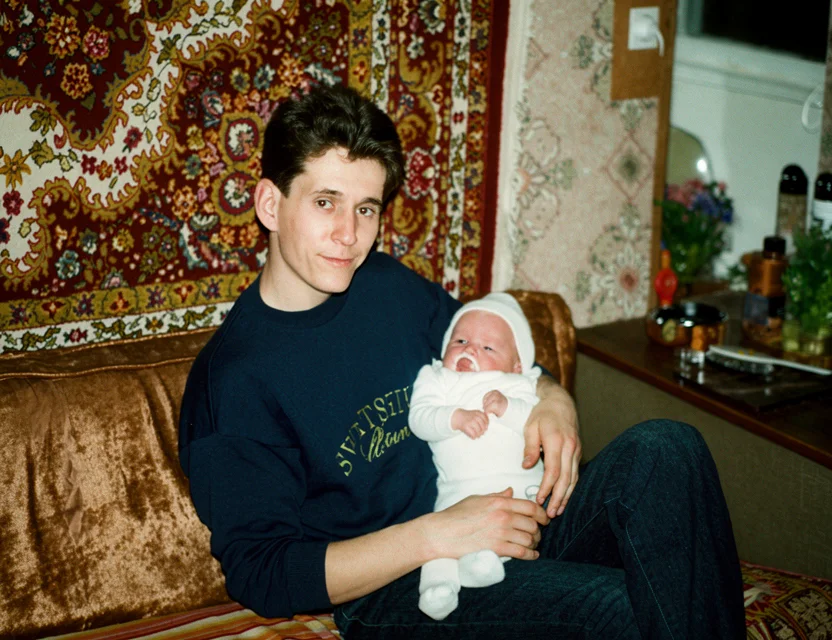 After
After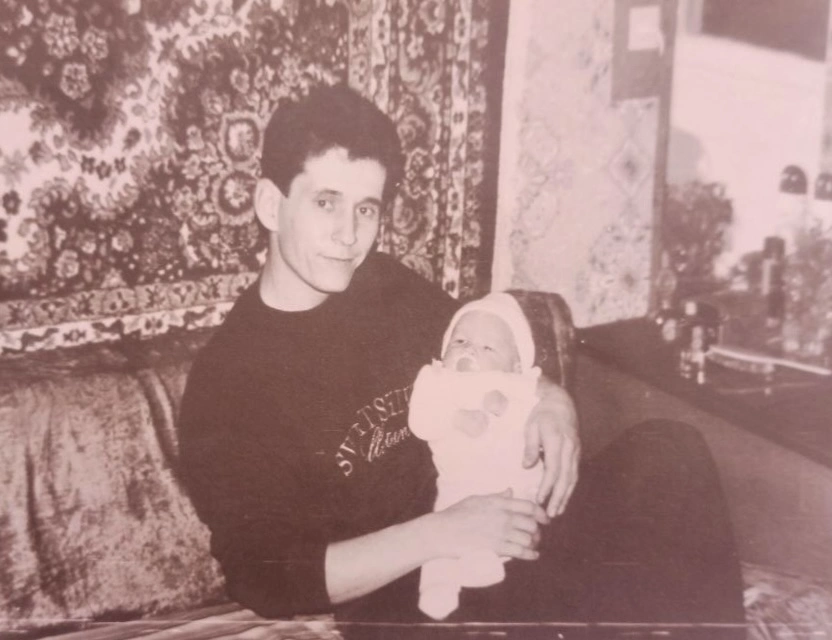 Before
Physical damage on prints comes in many forms, and the AI is trained to recognize each:
Hairline scratches from stacking and handling disappear cleanly.
Deeper scratches that cut into the emulsion are reconstructed with matching detail.
Dull scuffed patches regain their original texture and tone.
The white speckle of embedded dust is cleaned across the whole frame.
Water spots, foxing, and adhesive marks are removed without smearing.
The web of fine cracks on old prints is repaired while preserving faces.
Fine scratches, deep gouges, and scuff marks are found automatically — no masking or tracing by hand.
Dust specks, water spots, and stains are removed in the same pass as scratches.
Damaged areas are filled with matching texture, so the repair is invisible and the photo stays authentic.
No clone stamp, no healing brush — snap the photo and scratches are gone in seconds.
Removing a scratch by hand means cloning nearby texture over the damage, patch by patch — skilled, slow work that gets harder when a scratch crosses a face. The AI does the same thing at once for every scratch in the photo.
A detection model first maps all damaged pixels — scratches, dust, spots — separating them from photo content that just looks similar (telephone wires, hair strands, fence posts stay untouched). An inpainting model then fills each damaged area with texture and detail that match the surroundings.
Because the model was trained on real scratched prints and their clean versions, repairs stay invisible: skin keeps its texture, fabric keeps its weave, and backgrounds keep their grain. Fading and blur can be corrected in the same pass, so a scratched, faded print comes back fully restored.
Photograph your old print with your phone
Fine-tune the detected edges if needed
Get your restored photo in seconds
| What it takes | WowPhoto AI app | Photoshop or a paid service |
|---|---|---|
| Finding the damage | Every scratch detected automatically | Zoom in and trace each scratch by hand |
| Time per photo | Seconds | Up to hours with clone stamp and healing brush |
| Skills needed | None | Advanced retouching technique |
| Cost | First photo free | Paid software or per-photo retouching fees |
Photograph the print with the app (or pick a scanned copy from your gallery) — the AI finds and removes scratches, dust, and spots automatically in seconds. No manual tracing or editing.
Yes — download the app and your first repair is free, so you can check the quality on your own photo.
No. Only the damaged pixels are repaired; the rest of the photo is untouched. The filled areas copy the surrounding texture, so the repair is invisible rather than smoothed over.
Yes — faces get dedicated reconstruction, so a scratch across a cheek or an eye is repaired while keeping the person natural and recognizable.
Yes, dust specks, water spots, stains, and foxing are cleaned in the same pass — you don’t need a separate tool for each kind of mark.
No. Everything that would take a healing brush and clone stamp in Photoshop happens automatically in the app, in seconds.
Photos are uploaded over an encrypted connection and processed only to create your restoration. We never post your pictures publicly, never use them for advertising, and a result is shared only if you choose to share it. Restorations live in your personal in-app gallery, and you stay in control of every photo.
Download the app and get your first restoration for free.